How to install ComfyUI and the AI Arena models (Anima, Z-Anime, Z-Image, FLUX.2 Klein) on Windows with a 4 GB NVIDIA card, with screenshots of the workflows we use.
Windows 10 or 11 with an NVIDIA graphics card (ours: RTX 3050 Ti Laptop, 4 GB) and an up-to-date driver.
At least 16 GB of RAM: the weights that do not fit in video memory go to RAM.
Disk space: ComfyUI about 7 GB unpacked, plus 4–6 GB per model (see the table in step 3). All the models in this guide need about 31 GB, plus the 7 GB of ComfyUI.
We have not tried AMD cards or Macs: ComfyUI has other procedures for those and we cannot give timings.
2. Installing ComfyUI
Download the portable package for Windows and NVIDIA: ComfyUI_windows_portable_nvidia.7z (about 2 GB, always the latest official version). We used 0.45.0.
Extract the archive with 7-Zip into a folder with a short path and no spaces, for example C:\ComfyUI. You will get the ComfyUI_windows_portable folder.
Double-click run_nvidia_gpu.bat. A black window opens (the engine) and after a few seconds the browser with the interface, at http://127.0.0.1:8188.
Leave the launch settings as they are: no low-memory options are needed. With 4 GB ComfyUI manages the weight swapping by itself.
Our screenshots use the Italian interface (Settings → Language). The English node names are: Carica modello di diffusione = Load Diffusion Model, Carica CLIP = Load CLIP, Carica VAE = Load VAE, Immagine Latent Vuota = Empty Latent Image, Decodifica VAE = VAE Decode, Salva Immagine = Save Image, passaggi = steps, nome_sampler = sampler_name.
3. Downloading the models
Download only the ones you need and put them in the folders shown, inside ComfyUI_windows_portable\ComfyUI\. If they are in the right folder ComfyUI sees them right away (reload the page or press R).
The links go straight to the files on Hugging Face (if Hugging Face asks for it, accept the licence on the site). Check each model’s terms of use before using the images commercially: we have not verified them for you.
How much each “package” weighs: Anima (Turbo or Aesthetic) ≈ 4.2 + 1.2 + 0.25 = 5.7 GB the first time and 4.2 GB for the second version. Z-Image ≈ 6.2 + 3.5 + 0.34 = 10 GB. Z-Anime adds 6.2 GB (the other two files are the same as Z-Image). Klein ≈ 4.1 + 0.34 GB, reusing the Z-Image text encoder.
4. Loading a workflow and generating
In each section below you will find the Download the workflow (.json) button.
Drag the file onto the ComfyUI window: the same nodes as in our screenshots appear.
In the “Load…” nodes check that the chosen file is the one you downloaded (click the name to change it).
Write your prompt in the big box of the CLIP Text Encode node and press Run (or Ctrl+Enter).
The image appears in the Save Image node and is saved in ComfyUI\output.
The first image with a new model is slower: ComfyUI loads the file from disk. From the second on the times are the ones in the table.
All our workflows are 768 × 1024 pixels, seed 7 and “control after generate” set to fixed (the seed does not change): with the same prompt you get the same image as in our tests. For always-different images set the control to randomize.
The workflows, one by one
Model
Settings
Typical time
Range seen
Images timed
Anima Turbo v1.1
10 steps · CFG 1
26 s
18–56 s
94
Anima Aesthetic v1.1
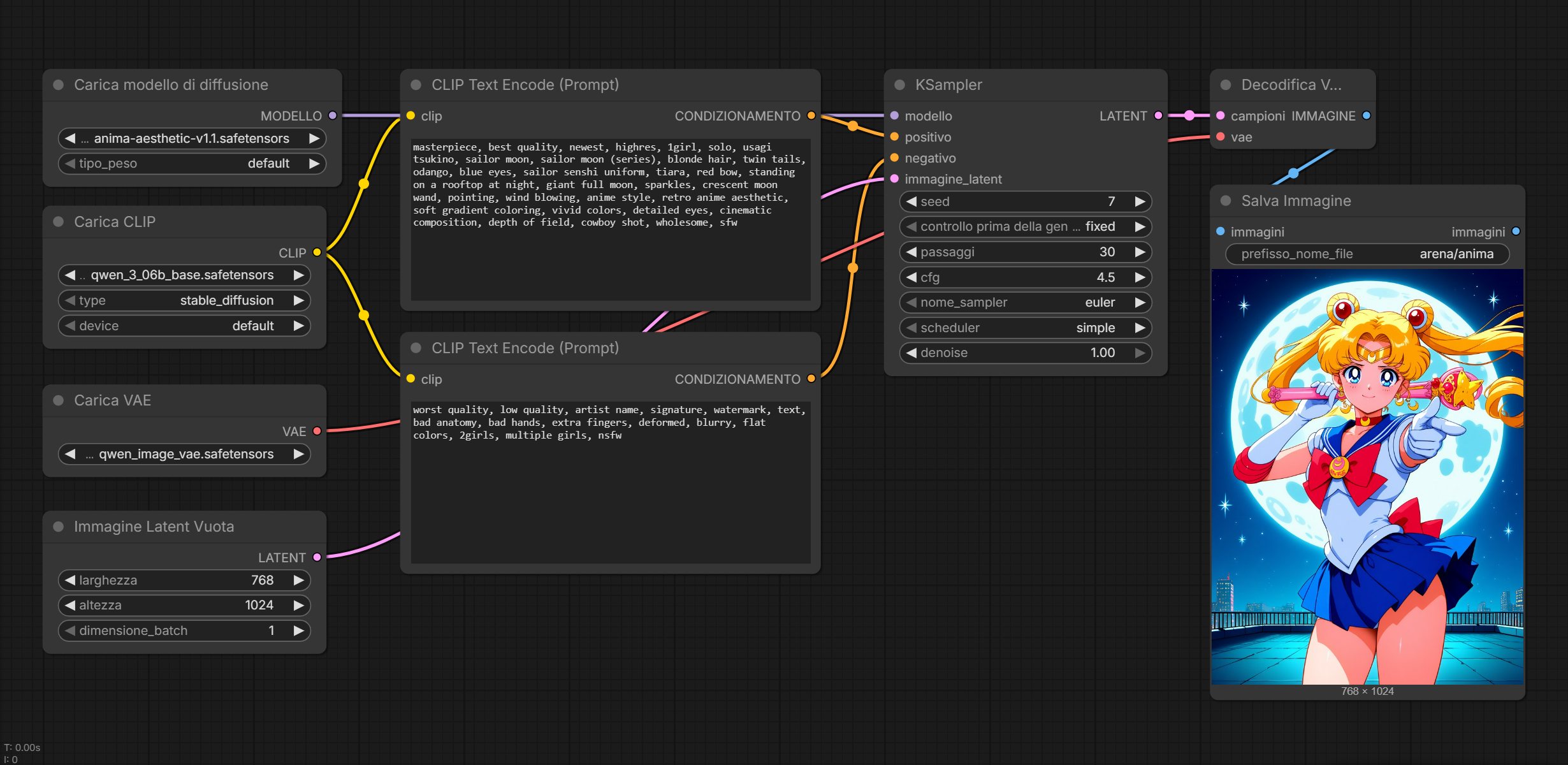
30 steps · CFG 4.5
84 s
80–110 s
125
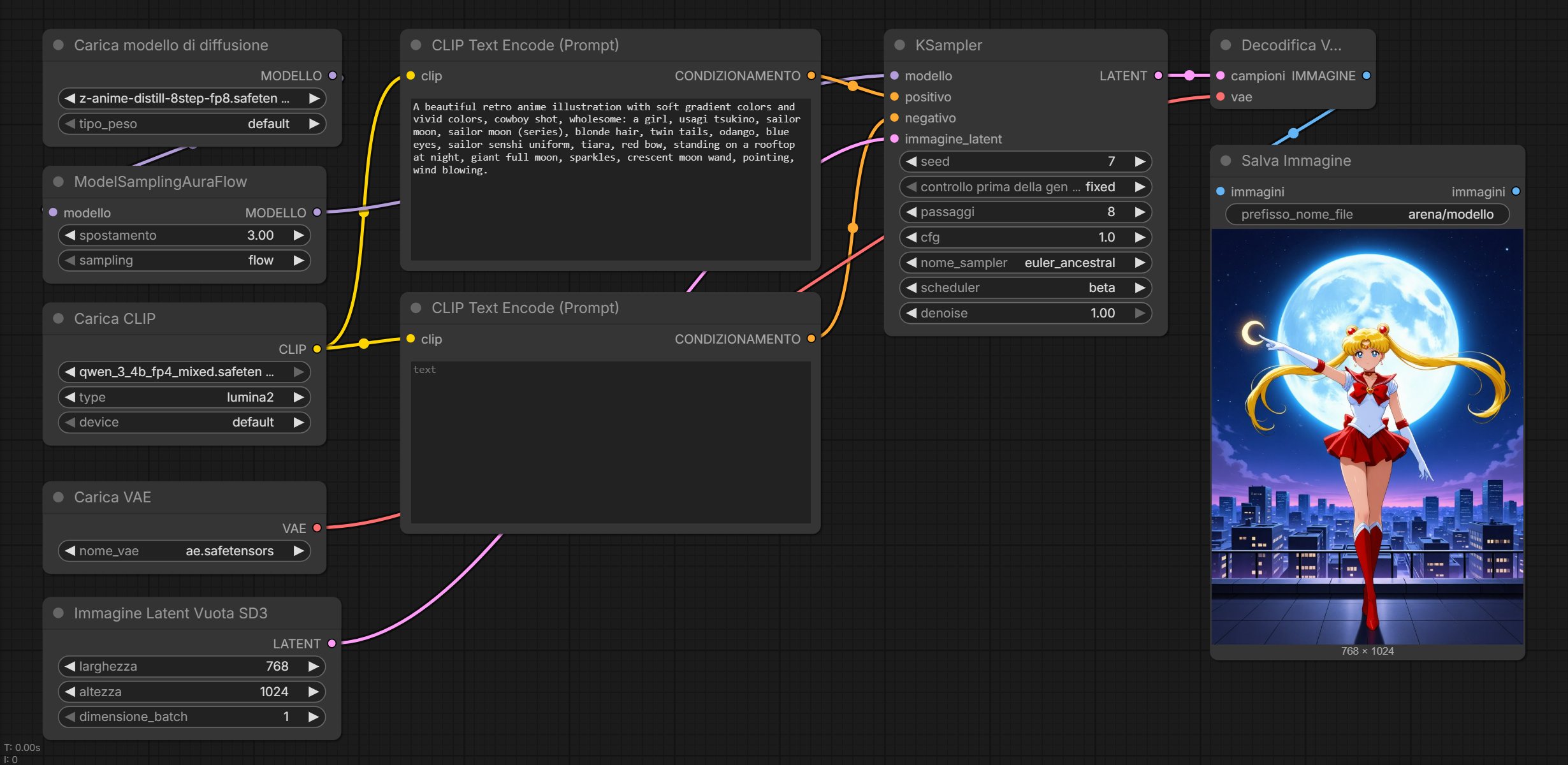
Z-Anime (distill 8 steps)
8 steps · CFG 1
46 s
34–96 s
156
Z-Image Turbo
8 steps · CFG 1
42 s
24–113 s
178
FLUX.2 Klein 4B (image edit)
4 steps · CFG 1 · about 1 megapixel
about 38 s
a single measurement (2026-11-14)
1
ACE-Step 1.5 Turbo (song)
8 steps · CFG 1
7–10 minutes per 60 s of music
estimate from our program, not re-measured
—
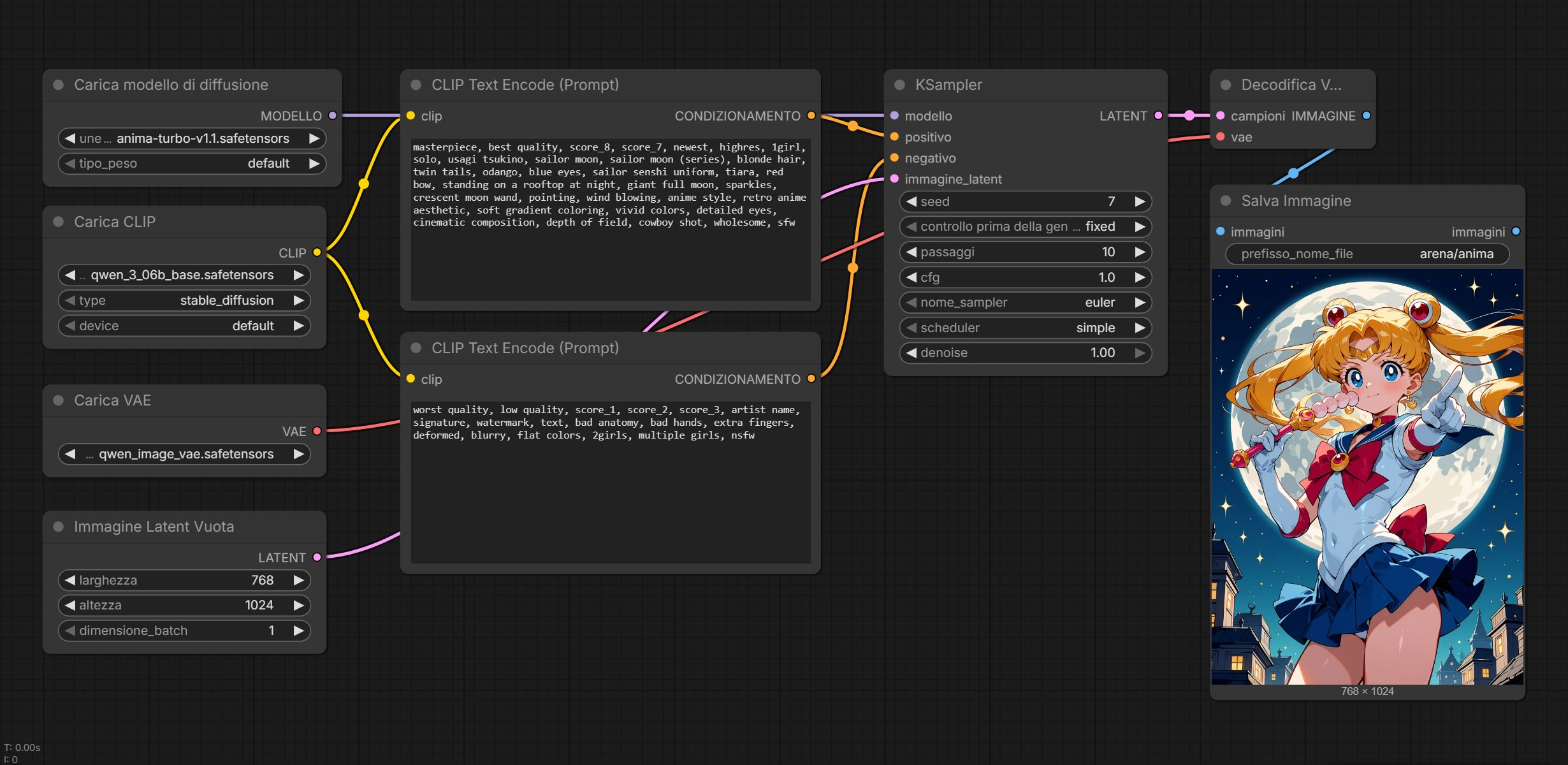
5. Anima Turbo
The fastest of the anime models. Tag prompt, with the quality tags first.
Setting
Value
Load Diffusion Model
anima-turbo-v1.1.safetensors
Load CLIP
qwen_3_06b_base.safetensors, type stable_diffusion
Load VAE
qwen_image_vae.safetensors
Size
768 × 1024
Steps
10
CFG
1.0
Sampler / scheduler
euler / simple
Negative prompt
yes, a list of defects to avoid
Sample prompt:masterpiece, best quality, score_8, score_7, newest, highres, 1girl, solo, …description…, anime style, soft gradient coloring, vivid colors, detailed eyes, cowboy shot Negative:worst quality, low quality, score_1, score_2, score_3, artist name, signature, watermark, text, bad anatomy, bad hands, extra fingers, deformed, blurry
Time on our card: about 26 s per image.
Anima Turbo workflow in ComfyUI, with the generated image in the Save Image node.
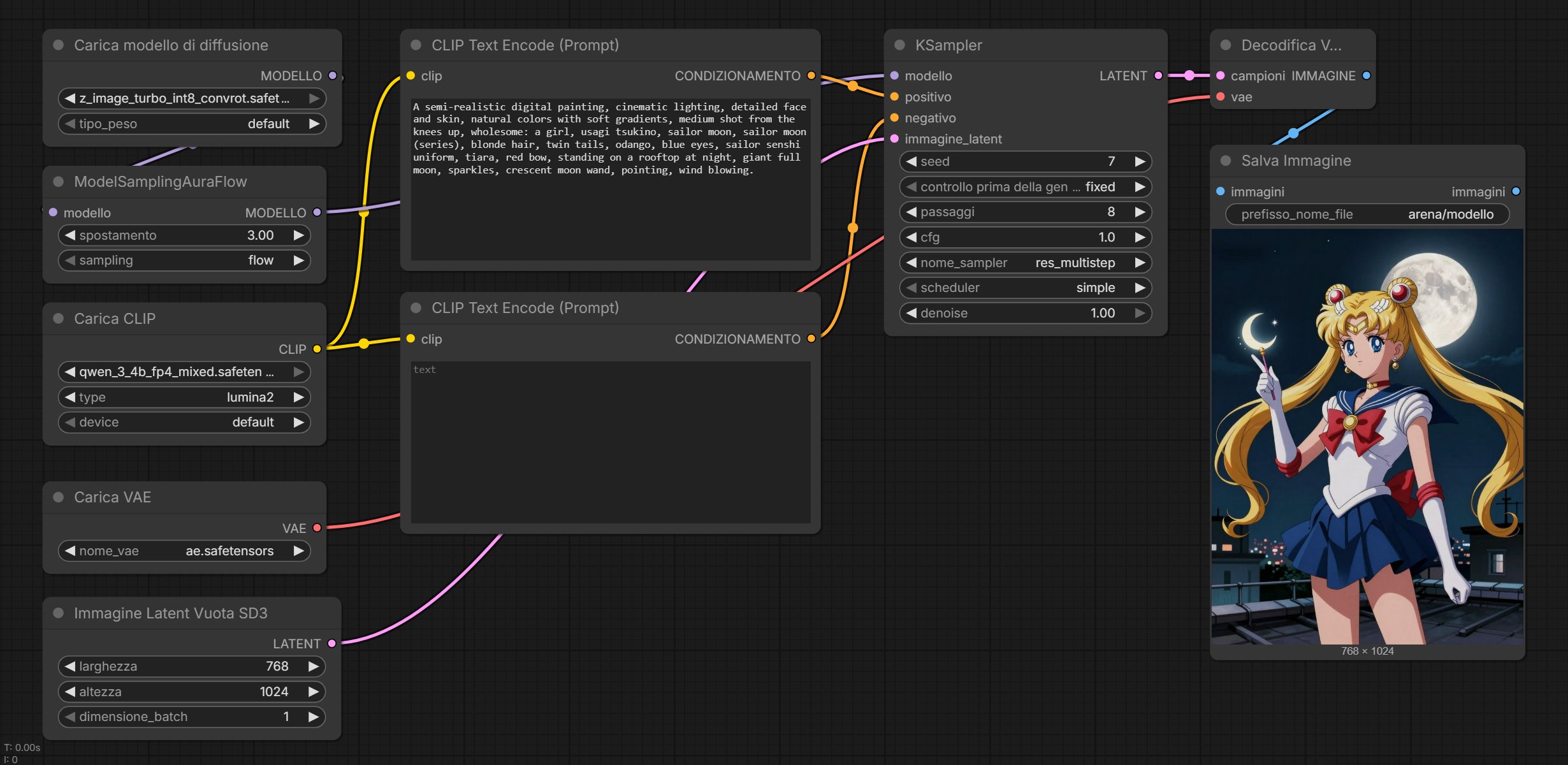
The most versatile model: digital painting and realistic photos. The workflow is almost identical to Z-Anime’s; the model and the sampler change.
Setting
Value
Load Diffusion Model
z_image_turbo_int8_convrot.safetensors
Load CLIP
qwen_3_4b_fp4_mixed.safetensors, type lumina2
Load VAE
ae.safetensors
ModelSamplingAuraFlow
shift 3.0
Size
768 × 1024
Steps
8
CFG
1.0
Sampler / scheduler
res_multistep / simple
Negative prompt
empty
Sample prompt:A semi-realistic digital painting, cinematic lighting, detailed face and skin, natural colors with soft gradients, medium shot from the knees up, …description…
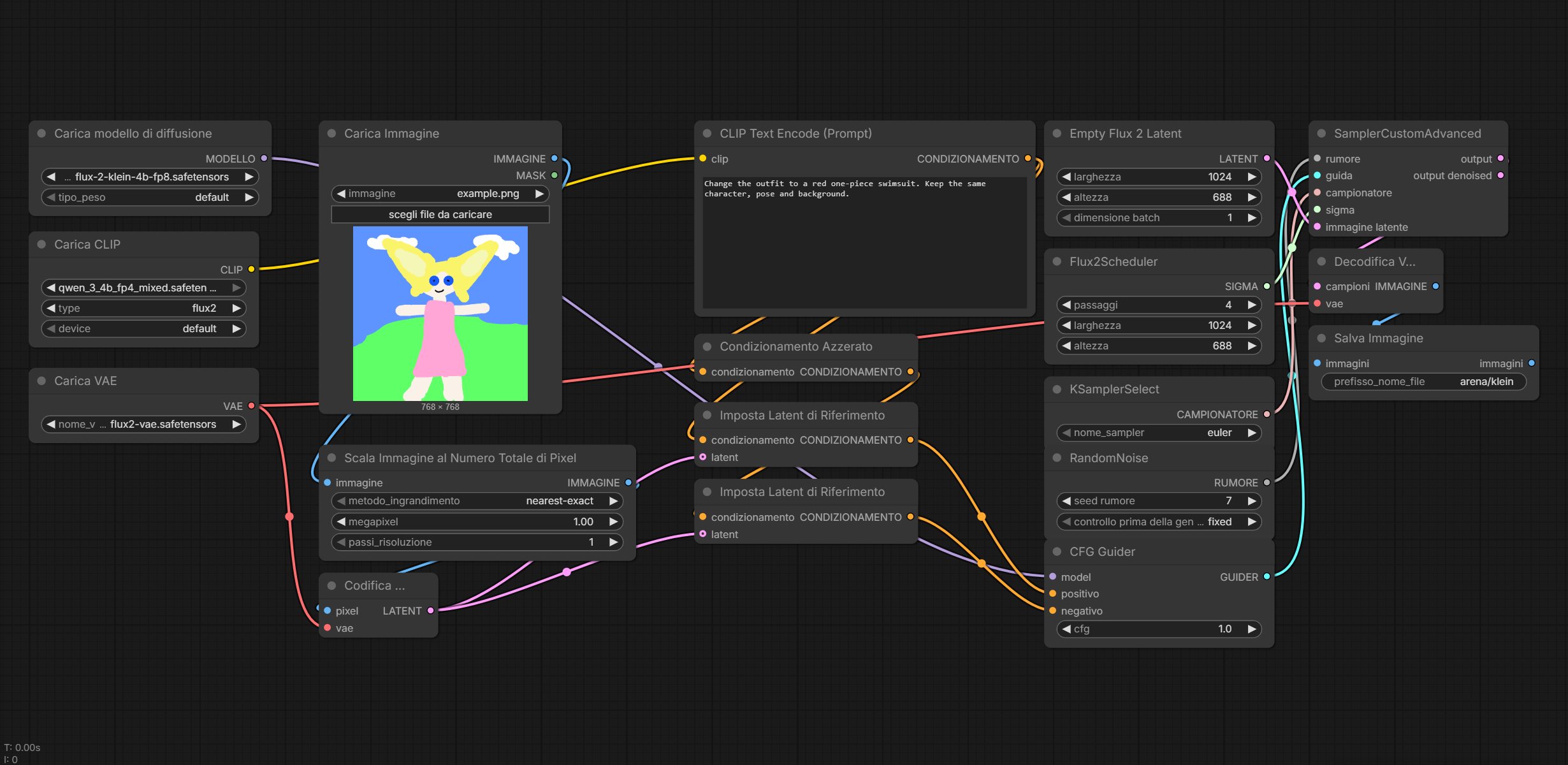
Here you start from an existing image and write what to change (English works better). The Load Image node takes the file from the ComfyUI\input folder (or you upload it with “choose file to upload”). The image is scaled to about 1 megapixel and used as a reference.
Setting
Value
Load Diffusion Model
flux-2-klein-4b-fp8.safetensors
Load CLIP
qwen_3_4b_fp4_mixed.safetensors, type flux2
Load VAE
flux2-vae.safetensors
Steps (Flux2Scheduler)
4
CFG (CFG Guider)
1.0
Sampler
euler
Working size
about 1 megapixel, keeping the original’s proportions (here 1024 × 688)
Sample instruction:Change the outfit to a red one-piece swimsuit. Keep the same character, pose and background.
Time on our card: about 38 s (single measurement). The downloadable workflow contains ComfyUI’s example image: replace it with your own.
FLUX.2 Klein workflow: the starting image enters as a “reference latent” and the text says what to change.
One thing at a time. Close games, heavy browsers and programs that use the graphics card: every free MB of VRAM helps.
Do not switch models all the time. Every switch forces a reload of 4–6 GB from disk: if you need many images, make them all with the same model.
Stay around 768 × 1024 (about 0.8 megapixel). To enlarge, use an upscale model afterwards, not a bigger starting size.
One image at a time (batch 1). With 4 GB a larger batch slows down or fails.
“Turbo” and “distill” models (few steps) are the ones suited to a small card: 8–10 steps instead of 30.
The disk matters. Models are 4–6 GB files: on an SSD the first image, which reads them from disk, usually starts sooner.
The Windows paging file is best kept enabled with free space: with 16 GB of RAM it may be needed when a large model is moved between card and memory.
11. If something goes wrong
Symptom
What to try
A node is red or says “model not found”
The file is not in the right folder or has a different name. Click the name in the node and pick the file from the list; if it is not there, check the table in step 3 and reload the page.
“Out of memory” / CUDA memory error
Close the other programs, reduce the size (for example 640 × 896), keep the batch at 1. If it only happens the first time, retry.
The first image takes many minutes
This is normal with a new model (reading from disk). If it keeps happening afterwards, the disk is slow or RAM is full.
Images are just noise or grey
Check that the VAE is the right one for the model (see the “Used by” column) and that the CLIP node type is correct (stable_diffusion, lumina2 or flux2).
A node does not exist
Your ComfyUI is too old: update it with update\update_comfyui.bat in the ComfyUI folder.